TeachMeiOS.com

TeachMeiOS.com

Tips, Tricks, and Tutorials for iPhone, iPad (Mini), iPod Touch, Apple Watch

Primary menu

Skip to primary content
Skip to secondary content
  • Home
  • iOS Basics
    • iOS Basics
    • iPhone
    • iPad
    • Siri
  • iOS Tips + Tricks
    • iOS Tips and Tricks
    • Quick Tips
    • iPhone
    • iPad
  • iOS Apps
    • iOS Apps
    • Free App of the Week
    • Free Apps
    • Word, Excel, and Powerpoint Apps
    • iPhone Apps
    • iPad Apps
  • iOS Accessories
    • iOS Accessories
    • iPhone
    • iPad
  • iOS Wallpaper
    • iPad and iPad Mini Backgrounds
    • iPhone and iPod Touch Backgrounds
  • Free App of the Week

Secondary menu

Skip to primary content
Skip to secondary content
  • Subscribe
  • Apps to Edit Word, Excel, and PPT
  • Free Premium Content
    • iPad and iPad Mini Backgrounds (Wallpaper)
    • iPhone and iPod Touch Backgrounds (Wallpaper)
  • iPhone Photography Gallery
  • About
    • About the Author
    • My Inspiration
    • Disclaimer
    • Site Feedback
  • Login

Image navigation

← Previous Next →

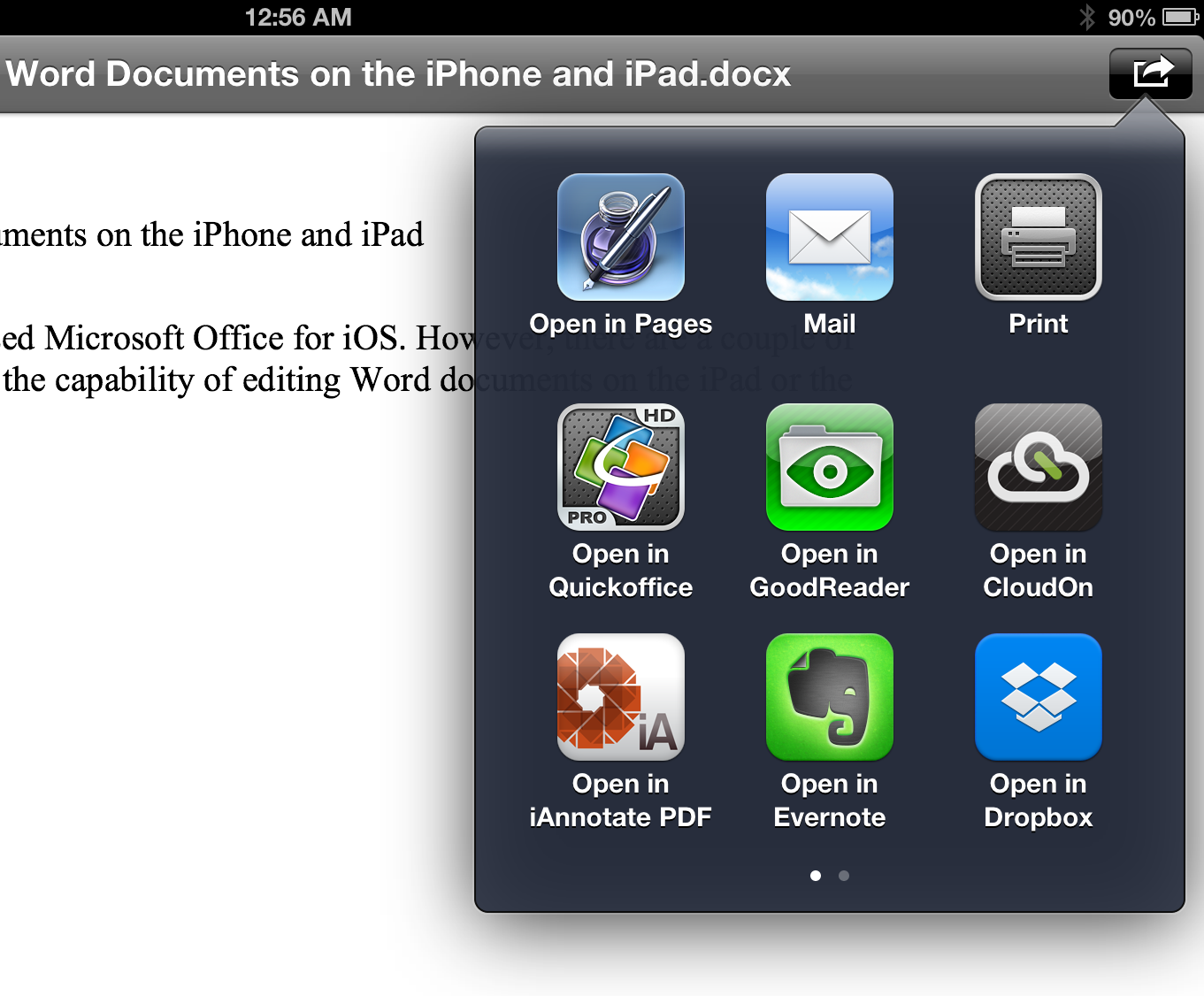
Use the Share feature in iOS 6 to open documents in other apps

Published December 23, 2012 at 1361 × 1126 in How to edit Microsoft Word, Excel, and Powerpoint Documents on the iPad (Mini), iPhone, and iPod Touch

Tap on the Share Icon in the upper left corner of a document opened in an email to open it with another app.

Share this:

  • Facebook
  • LinkedIn
  • Twitter
  • Pinterest
  • Reddit
  • More
  • Email
  • Tumblr
  • Print

About this site…

This site provides you with tips, tricks, tools, tutorials, how to’s and recommended apps for iPhone, iPad, iPod Touch and Apple Watch running iOS 12 and older. The goal is to give you resources to help you learn how to use your iOS device or wearable. Whether you own an iPad Pro running iOS 12 an iPhone Xs or Xs Max, an iPad Air or iPad Mini, an iPod Touch or Apple Watch or any other iOS gadget that Apple has released, this website will show you how to get the most out of your tech device. The goal is to provide helpful how to’s, tips, tricks, and training on how to get more out of your iOS device. This site is useful to a first time iOS user as well as an advanced user. I hope that when you leave this site, you will have learned how to get your iOS device to work for you!

Subscribe to TeachMeiOS to get free stuff!

Subscribe Now

Login Here

Lost your password?

Follow TeachMeiOS

Follow Us on FacebookFollow Us on Google+Follow Us on TwitterFollow Us on PinterestFollow Us on RSS

Most Popular Posts

  • New Features in iOS 8 - What to Expect
    New Features in iOS 8 - What to Expect
  • Special Offer on Siri Book (30% off)
    Special Offer on Siri Book (30% off)
  • Quick Tip: Use "Reader" function in Safari to focus in on a webpage article on your iPhone or iPad
    Quick Tip: Use "Reader" function in Safari to focus in on a webpage article on your iPhone or iPad
  • How to remotely access your computer using iPhone, iPad (Mini), and iPod Touch
    How to remotely access your computer using iPhone, iPad (Mini), and iPod Touch
  • Jailbreak 101 – Lesson 3: Pros and Cons of Jailbreaking
    Jailbreak 101 – Lesson 3: Pros and Cons of Jailbreaking
  • Home Button (From Lockscreen)
    Home Button (From Lockscreen)
  • How to use Reading List on your iPhone, iPad, or iPod Touch
    How to use Reading List on your iPhone, iPad, or iPod Touch
  • How to Track Flights on iPhone and iPad
    How to Track Flights on iPhone and iPad
  • About
    About
  • Set a reminder or send a quick message in response to an incoming call you can't take
    Set a reminder or send a quick message in response to an incoming call you can't take

Facebook Page

Facebook Page

Twitter

TeachMeiOS
TeachMeiOS on Twitter
Follow @TeachMeiOS
919 people follow TeachMeiOS
Dmotte1 Dmotte1 gyogynovenyinfo gyogynov DiaconuAdrian16 DiaconuA vovoeM vovoeM Rabdaradio Rabdarad 3KH95 3KH95 AndiAlamsyahKa2 AndiAlam ArnoldCDeal ArnoldCD iDoudJ iDoudJ neela_perumal neela_pe Saleemmatrix Saleemma j10walsh j10walsh NajwaYazid2 NajwaYaz 1vipapple1 1vipappl brauleo9 brauleo9

Tag Cloud

App Apps Camera Camera App Cydia Email Home Button iOS 5 iOS 6 iOS 7 iOS 8 iOS 9 iOS Basics iOS Basics: Siri iOS Tips and Tricks: iPad iOS Tips and Tricks: iPhone iPad Air iPad Cellular iPad Mini iPad Mini Cellular iPhone 4 iPhone 4S iPhone 5 iPhone 5C iPhone 5S iPhone 6 iPhone 6 Plus iPhone 6s iPhone 6s Plus iPod Touch Jailbreak Jailbreaking Keyboard Lockscreen Music Organization Photo Photography Photos Pictures Quick Tip Safari Browser Taking Pictures Tips and Tricks Typing

Meta

  • Log in
  • Entries feed
  • Comments feed
  • WordPress.org
Copyright © 2026 TeachMeiOS.com. All Rights Reserved.
Powered by: WordPress | Theme: Catch Box Pro
Thank you! Please check your inbox to confirm your subscription. Send an email to doug@teachmeios.com with your App Giveaway Choice.
Loading...

Don't miss a tip or trick Subscribe Now