TeachMeiOS.com

TeachMeiOS.com

Tips, Tricks, and Tutorials for iPhone, iPad (Mini), iPod Touch, Apple Watch

Primary menu

Skip to primary content
Skip to secondary content
  • Home
  • iOS Basics
    • iOS Basics
    • iPhone
    • iPad
    • Siri
  • iOS Tips + Tricks
    • iOS Tips and Tricks
    • Quick Tips
    • iPhone
    • iPad
  • iOS Apps
    • iOS Apps
    • Free App of the Week
    • Free Apps
    • Word, Excel, and Powerpoint Apps
    • iPhone Apps
    • iPad Apps
  • iOS Accessories
    • iOS Accessories
    • iPhone
    • iPad
  • iOS Wallpaper
    • iPad and iPad Mini Backgrounds
    • iPhone and iPod Touch Backgrounds
  • Free App of the Week

Secondary menu

Skip to primary content
Skip to secondary content
  • Subscribe
  • Apps to Edit Word, Excel, and PPT
  • Free Premium Content
    • iPad and iPad Mini Backgrounds (Wallpaper)
    • iPhone and iPod Touch Backgrounds (Wallpaper)
  • iPhone Photography Gallery
  • About
    • About the Author
    • My Inspiration
    • Disclaimer
    • Site Feedback
  • Login

Image navigation

Next →

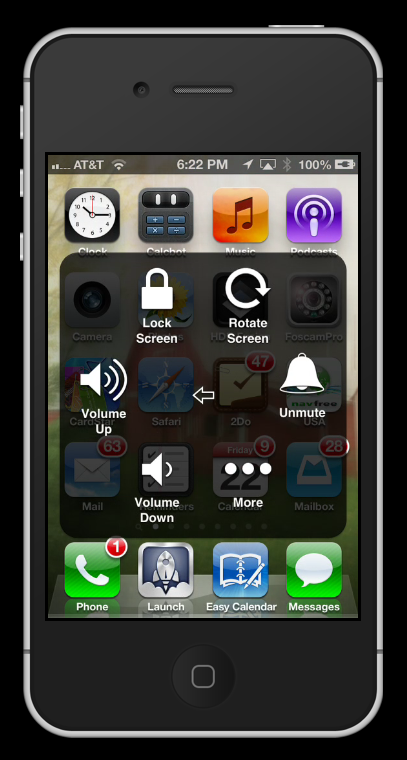
Access multiple features with assistive touch mode

Published February 22, 2013 at 407 × 760 in How to bypass a broken Home Button on your iPhone, iPad (Mini), and iPod Touch
How to's for iPhone, iPad (Mini), and iPod Touch

Share this:

  • Facebook
  • LinkedIn
  • Twitter
  • Pinterest
  • Reddit
  • More
  • Email
  • Tumblr
  • Print

About this site…

This site provides you with tips, tricks, tools, tutorials, how to’s and recommended apps for iPhone, iPad, iPod Touch and Apple Watch running iOS 12 and older. The goal is to give you resources to help you learn how to use your iOS device or wearable. Whether you own an iPad Pro running iOS 12 an iPhone Xs or Xs Max, an iPad Air or iPad Mini, an iPod Touch or Apple Watch or any other iOS gadget that Apple has released, this website will show you how to get the most out of your tech device. The goal is to provide helpful how to’s, tips, tricks, and training on how to get more out of your iOS device. This site is useful to a first time iOS user as well as an advanced user. I hope that when you leave this site, you will have learned how to get your iOS device to work for you!

Subscribe to TeachMeiOS to get free stuff!

Subscribe Now

Login Here

Lost your password?

Follow TeachMeiOS

Follow Us on FacebookFollow Us on Google+Follow Us on TwitterFollow Us on PinterestFollow Us on RSS

Most Popular Posts

  • iPhone Photography Gallery
    iPhone Photography Gallery
  • Quick Tip: How to set songs from your music library to be your iPhone, iPad (Mini), or iPod Touch Alarm Clock Sound
    Quick Tip: How to set songs from your music library to be your iPhone, iPad (Mini), or iPod Touch Alarm Clock Sound
  • 4 Tips for Maps App on iPhone: Quick Navigate, Walking Directions, ETA, and Siri Navigation
    4 Tips for Maps App on iPhone: Quick Navigate, Walking Directions, ETA, and Siri Navigation
  • How to get your iPhone, iPad (Mini), and iPod Touch to Read any selectable text out loud
    How to get your iPhone, iPad (Mini), and iPod Touch to Read any selectable text out loud
  • How to use your iPhone, iPad (Mini), or iPod Touch as a Walkie-talkie
    How to use your iPhone, iPad (Mini), or iPod Touch as a Walkie-talkie
  • How to select, copy, cut, and paste on iPhone, iPad (Mini) and iPod Touch
    How to select, copy, cut, and paste on iPhone, iPad (Mini) and iPod Touch
  • How to care for the battery in iPhone, iPad (Mini), and iPod Touch
    How to care for the battery in iPhone, iPad (Mini), and iPod Touch
  • Quick Tip: Use "Reader" function in Safari to focus in on a webpage article on your iPhone or iPad
    Quick Tip: Use "Reader" function in Safari to focus in on a webpage article on your iPhone or iPad
  • Knock Review - Unlock your Mac using your iPhone
    Knock Review - Unlock your Mac using your iPhone
  • Ask Siri: Did you know that Siri in iOS 6 can give you nutritional information on most foods?
    Ask Siri: Did you know that Siri in iOS 6 can give you nutritional information on most foods?

Facebook Page

Facebook Page

Twitter

TeachMeiOS
TeachMeiOS on Twitter
Follow @TeachMeiOS
919 people follow TeachMeiOS
Dmotte1 Dmotte1 gyogynovenyinfo gyogynov DiaconuAdrian16 DiaconuA vovoeM vovoeM Rabdaradio Rabdarad 3KH95 3KH95 AndiAlamsyahKa2 AndiAlam ArnoldCDeal ArnoldCD iDoudJ iDoudJ neela_perumal neela_pe Saleemmatrix Saleemma j10walsh j10walsh NajwaYazid2 NajwaYaz 1vipapple1 1vipappl brauleo9 brauleo9

Tag Cloud

App Apps Camera Camera App Cydia Email Home Button iOS 5 iOS 6 iOS 7 iOS 8 iOS 9 iOS Basics iOS Basics: Siri iOS Tips and Tricks: iPad iOS Tips and Tricks: iPhone iPad Air iPad Cellular iPad Mini iPad Mini Cellular iPhone 4 iPhone 4S iPhone 5 iPhone 5C iPhone 5S iPhone 6 iPhone 6 Plus iPhone 6s iPhone 6s Plus iPod Touch Jailbreak Jailbreaking Keyboard Lockscreen Music Organization Photo Photography Photos Pictures Quick Tip Safari Browser Taking Pictures Tips and Tricks Typing

Meta

  • Log in
  • Entries feed
  • Comments feed
  • WordPress.org
Copyright © 2026 TeachMeiOS.com. All Rights Reserved.
Powered by: WordPress | Theme: Catch Box Pro
Thank you! Please check your inbox to confirm your subscription. Send an email to doug@teachmeios.com with your App Giveaway Choice.
Loading...

Don't miss a tip or trick Subscribe Now